Follow vitals over time
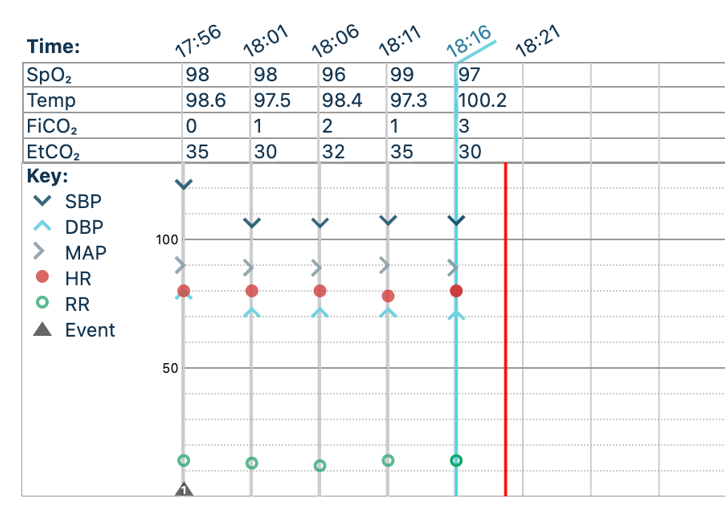
Review numerical readings and trend charts for measurements such as blood pressure, mean arterial pressure, heart rate, and oxygen saturation. Available measurements depend on your monitor and connection.
Automate vitals
Connect a compatible patient monitor to Xchart Suite to capture vitals automatically, follow trends throughout the procedure, and view waveforms from supported monitors, with control over the final anesthesia record.
Why it matters
Reading a monitor and transferring those measurements into a chart is repetitive work. Automatic capture brings supported measurements into Xchart so your team can follow the case without entering every reading by hand.
In practice
Review numerical readings and trend charts for measurements such as blood pressure, mean arterial pressure, heart rate, and oxygen saturation. Available measurements depend on your monitor and connection.
Waveform capture adds another view of monitor output alongside numerical vitals. Check your model’s catalog entry for waveform capture compatibility; it is not available with every monitor or connection.
Automatic capture supports documentation without taking away your ability to review and edit the data on the final anesthesia report.
Take a closer look
Supported models include monitors from Mindray, GE, Criticare, Edan, and Zoe Medical. Compatibility is specific to the model and connection, not just the manufacturer. The catalog shows connection options, waveform capabilities, and monitors available from Xchart.
The workflow
Check the catalog for supported measurements, connection options, and waveform capabilities.
Follow the instructions for your model. Depending on the setup, you may use a cable, network connection, or Xlink.
Bring vitals into your Xchart case and review the data before finalizing the record.
The products behind the solution
The software where monitor data becomes part of your anesthesia charting workflow.
Explore Xchart SuiteFind your equipment, compare capabilities, or explore compatible monitors sold by Xchart.
Explore Vitals MonitorsExplore connectivity hardware for supported monitor setups.
Explore XlinkAlready using Xchart?
Connecting new equipment or exploring waveform capture? Start with the instructions for your exact monitor model.