Prepare with your team
Review patient histories, use case presets, and let staff help prefill information before the procedure.
Create anesthesia records
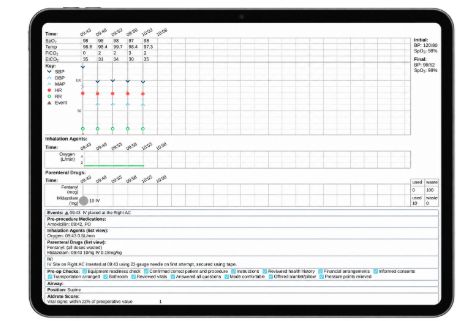
Bring patient information, vitals, medications, and procedure notes into one digital anesthesia record, from preparation through final review.
Why it matters
Your record starts before the procedure and continues as care unfolds. Xchart gives providers and staff a shared place to prepare information, document the case, and produce a legible report at the end.
In practice
Review patient histories, use case presets, and let staff help prefill information before the procedure.
Record medications, local anesthetics, and timestamped notes. Connect a compatible monitor to capture vitals automatically.
Review the case, check for missing information, and produce a familiar-looking PDF anesthesia record.
Take a closer look
A finished record should be easy to read and useful to the people reviewing it. Request sample records to see the report format and how case details are presented. The resulting PDF can be attached to the patient record in your existing EMR.
Get sample anesthesia recordsThe workflow
Gather patient information and prepare the case using presets and checklists.
Keep vitals, drugs, and notes together as your team documents the care provided.
Review, edit, and finalize the record, then save the report with your patient documentation.
The products behind the solution
Explore the charting software and the plans for different levels of anesthesia care.
Explore Xchart SuiteAlready using Xchart?
Looking to get more from your charting workflow? Explore presets, team participation, and automatic vitals capture.
Keep exploring